


Who gets notified if your freezer stops at two o'clock tonight?
Kim Djurhuus has been in the industry since 2000 and has worked on setting up monitoring systems since 2018. In three minutes he shows what goes wrong, what it costs, and what a system needs to do to prevent it.
Used by




and more

Watch the walkthrough. 3 minutes.

Since 2000
“I have seen what it costs when decisions are made on too thin a basis”
Kim Djurhuus has worked in the industry since the 1990s. First with automation and control panels, then as product manager for monitoring solutions at Siemens and, from 2008, as a supplier of IT infrastructure, validation and consultancy to some of the largest pharmaceutical companies in Denmark. He has seen how much the first decisions in a project matter, both for the budget and for the solution you end up with.
That experience is what the video is built on. No product walkthrough, no specifications. Just a short look at what it means to have us as an adviser and sparring partner on a project.
of experience in the industry
people in Måløv who know your installation
partner from design to operation
Without documentation, the medicine is declared unfit for use
If the environment goes outside the limits and you cannot document for how long, there is no discussion. And then the bill is not a new logging system. It is the value of the entire stock, plus the deviation you have to explain afterwards.
Friday evening
The compressor fails, or a door does not close. Nobody is in the building.
Monday morning
The damage is done, and nobody can say how long it went on.
At the audit
The answer is a paper log with an empty field. That is not an answer.
What the solution looks like
Wireless sensors at every piece of equipment, one gateway for the whole building, and software that keeps calling until someone acknowledges.

Measures around the clock
Temperature, humidity, CO2 and differential pressure. The sensor sits inside the equipment, the data logger outside.

Calls on deviation
Calls, texts and emails to the person on call. If they do not answer, it moves on to the next person.

Stores everything
Every reading, every alarm and every acknowledgement with name and timestamp, in a log that cannot be altered.

Delivers the documentation
Choose a period and pull the report as PDF or CSV. Ready before anyone asks for it.
OCEAView from DICKSON, set up and looked after by us
You get your own DICKSON system. We make sure it is set up correctly, validated and maintained, from installation and calibration to ongoing service.
OCEAView
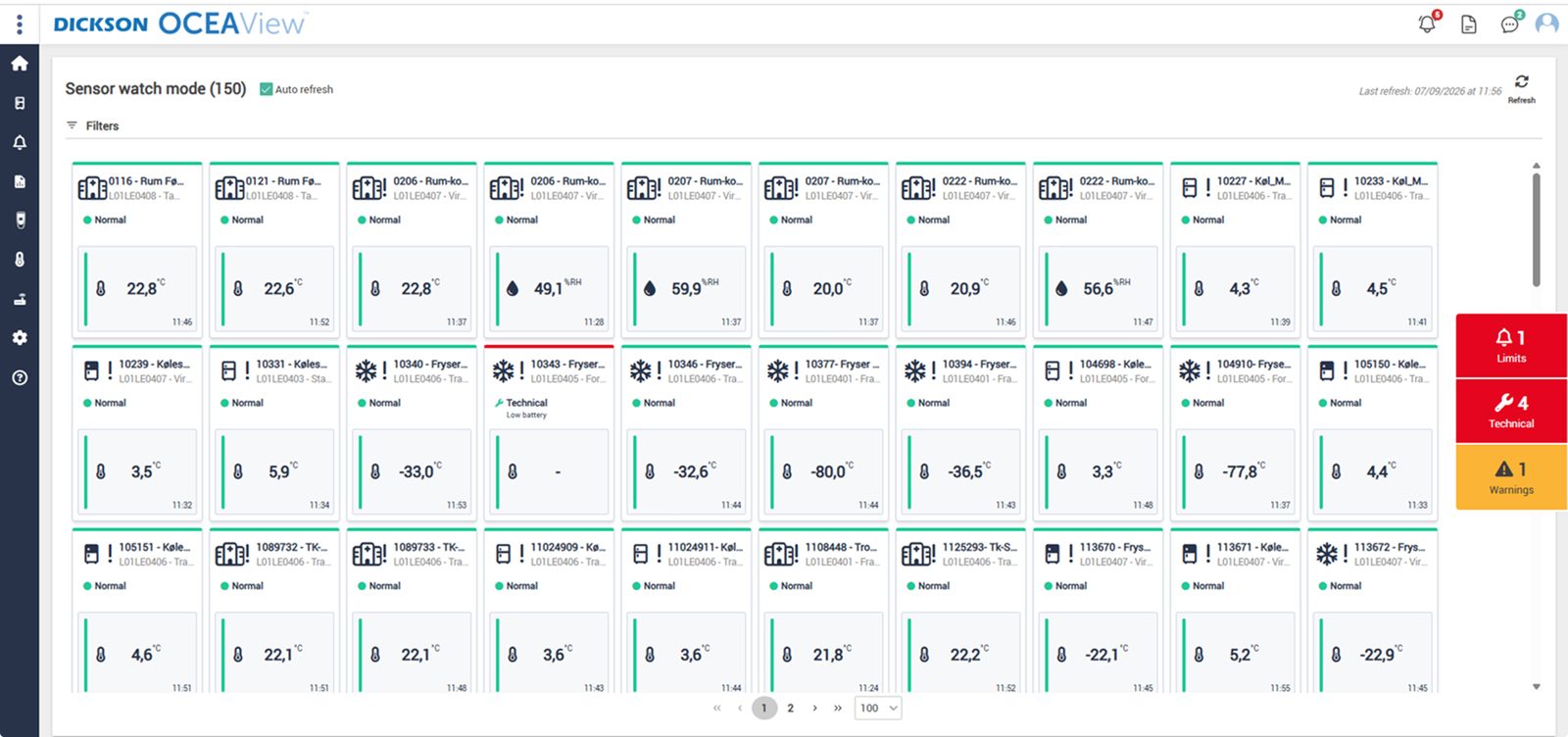
The whole setup on one screen. Watch mode gives a combined status overview of the equipment you have access to, with up to 100 units per page, while the graphs can be zoomed right down to the individual minute. With Plan View, the measuring points can also be placed directly on your own floor plan.
Audit trail that cannot be altered
Every reading, alarm and acknowledgement with timestamp and user. That is what an auditor asks for.
One-click reports
Choose a period and pull the report as PDF or CSV. Ready before anyone asks.

Cloud or your own servers
On-premises runs at your site with LDAP, and you control updates yourselves, so the qualification holds.
DICKSON
The manufacturer
Builds data loggers, sensors and OCEAView. French and American production, its own accredited calibration laboratories and CE, FCC and IC approved equipment.
Djurhuus IT
Distributor since 2018
We advise on placement, design the setup, install, set up alarms and on-call rotas, train your staff on the system and manage calibration afterwards.
You
Owner of the system
The system is yours. You set limits, response times and requirements according to your own SOPs. We supply the system and the documentation, carry out the validation, on our own or in close cooperation with you, and maintain it afterwards.
You do not have to run the project. We do.
From the first walkthrough until the system is running and your staff are trained. On time and within budget.
Walkthrough
We visit, look at equipment and premises and advise on where the sensors should go. Where it matters, not where it is easy. On-site visit, 1 to 2 hours, no obligation.
Tailored proposal
A hospital pharmacy and a production line do not have the same needs. The quote is built on what we have seen.
Installation and setup
Wireless, with no cables through walls, and operations keep running in the meantime. Limits, on-call rotas and escalation are set up together with you, and your staff are trained.
Operation and calibration
Calibration on time via accredited partners, sensor exchange without downtime, and a phone answered by someone who knows your installation.
Documentation and validation
Audit trail, electronic signatures and traceable calibration certificates from day one. We also carry out the validation, on our own or in close cooperation with your QA.
What you get is not a box on the wall
It is knowing what is happening in your premises. Around the clock. That the alarm actually goes off while there is still time to save the products. That the documentation is ready before anyone asks for it. And that your QA can rest easy.
Questions we get after the video
What does it cost?
It depends on the number of measuring points, which parameters need to be measured, and how spread out the equipment is. That is why we do not give a figure without having visited. The walkthrough comes with no obligation.
Is it a big IT project?
No. The system is wireless, so no cables need to be run through walls, and the units do not need to be on your network. A typical installation does not disrupt operations.
Do we have to validate the system ourselves?
No, you do not have to. We carry out the validation, on our own or in close cooperation with your QA. You define the scope based on your risk assessment.
Who does the calibration?
Accredited partners, DFM and DICKSON. We take care of the planning, the sensor exchange, the certificates and making sure the intervals are kept.
What is the difference between an FMS and a CTS/BMS?
A CTS/BMS controls the building's technical installations, while an FMS monitors and documents the conditions. In other words, the FMS does not regulate the plant, but records readings, alarms and history independently, which also makes the system simpler to validate.
What if we already have a system?
Then we take a look at it. Sometimes it makes sense to supplement rather than replace, and we will tell you if that is the case.
Kom hurtigt i kontakt med den rette specialist.
Vi hjælper med alt fra nye monitoreringsløsninger til kalibrering, validering og teknisk support.
Generelle henvendelser

Nye projekter
IT & teknik
Administration
Besøg os
Måløv Byvej 229
2760 Måløv
Ring til os
+45 72 22 02 05
Man-fre, 08-16
Fortæl os, hvad du har brug for.
Vil du se, hvordan det ser ud hos jer?
Book en gennemgang. Vi kommer forbi, ser på udstyr og lokaler og rådgiver om, hvor følerne skal sidde. Derefter får du et skræddersyet forslag. Uden forpligtelser.
Book en gennemgang